


- Contents
PureConnect Release Notes
Security and Compliance Enhancements
The following security and compliance enhancements are new in CIC 4.0 SU2.
Logon Authentication
Interaction Administrator includes new configuration options that affect client authentication methods. The following figure shows the new configuration options.
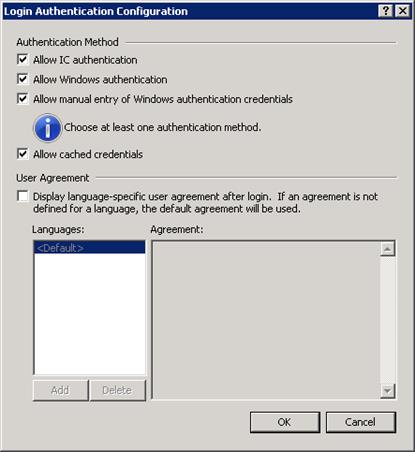
With these new configuration options, an administrator can configure the system to not allow CIC user name and passwords and only allow Windows authentication. It is also possible to configure the system to disallow cached credentials, requiring users to always enter their password when starting Interaction Client.
If the User Agreement option is configured to display the user agreement after logon, the information from the user agreement appears after a user logs on, but before the application starts. The user must accept the agreement before they start the application.
Forward & Follow-Me Security Rights
SU2 includes new phone number classifications for the Available, Forward and Available, Follow Me statuses. This new option allows system administrators to configure separate call classifications for when the user is logged on and when using Available, Forward and Follow Me.
Users can still have rights to place International calls, but would not automatically be able to set their Available, Forward and Available, Follow-Me numbers to International numbers.
Secure Input
Secure input provides a tool to assist organizations meet PCI compliance standards. The secure input/secure IVR separates and encrypts data to protect it from theft or misuse.
PureConnect provides five Interaction Designer tools with which you can implement secure input in handlers. Because of the wide variety of secure input needs, Interaction Center does not include a standardized secure input feature. Use the handler tools to create secure input features that fit the needs of your organization.
A secure input handler starts a separate, secure session inside the customer-agent interaction. It collects the confidential information from the customer, validates it with the appropriate web service. After ending the secure session, the handler returns both the customer and agent to the main interaction.
Secure input provides two key security features: audio separation and data protection
Audio Separation
If a customer-agent interaction requires automatic validation of confidential information, such as a credit card number, secure input separates the customer's audio from other parties. This feature protects confidential data from accidental capture by the agent, coaches, monitors, and others. Interaction Center and its subsystems do not capture and do not record the customer's audio.
Data Protection
In addition to separating audio from the agent, CIC protects the secure data from access by other users of the system:
-
No tracing: CIC processes involved in a secure session (Telephony Server, Media Server, Interaction Recorder, and so forth) avoid tracing of sensitive information.
-
Minimal access to sensitive information in memory: Only a minimal set of authorized processes has access to sensitive data. In particular, only TsServerU.exe and ininmediaserverU.exe have access to secure data within Interaction Center. This safeguard lowers the risk of accidental disclosure.
Example of Secure Input
An external customer makes an inbound call to an agent. At some point in the interaction, the customer is ready to provide credit card information. The agent clicks the Interaction Client Secure Session toolbar button to start a secure session. At that point, audio between the agent and customer separates.
-
The agent hears hold music to indicate that the call is still connected. When the call reconnects the agent with the customer, Interaction Client alerts the agent.
-
The customer navigates an Interactive Voice Response (IVR) system and provides credit card information. Interaction Center sends the information to a web service that the agent's organization implemented. The web service then sends the information to the credit card issuer for validation. At the end of the IVR, Interaction Center re-establishes the audio between the customer and the agent. It informs both customer and agent of the outcome (success or failure, with a tracking number and reason for any failure).
For more information about secure input, see the Secure Input Technical Reference, on the PureConnect Documentation Library.