


- Contents
Genesys Cloud for PureConnect Administrator's Guide
Configure Genesys Cloud for SMS Provisioning
To configure Genesys Cloud for SMS Provisioning
-
Review Requirements, including the CIC user configuration requirements.
-
In Interaction Administrator, open System Configuration > Genesys Cloud.
-
On the right side, double-click Configuration.
-
In the Genesys Cloud Configuration dialog, select the SMS Configuration tab.
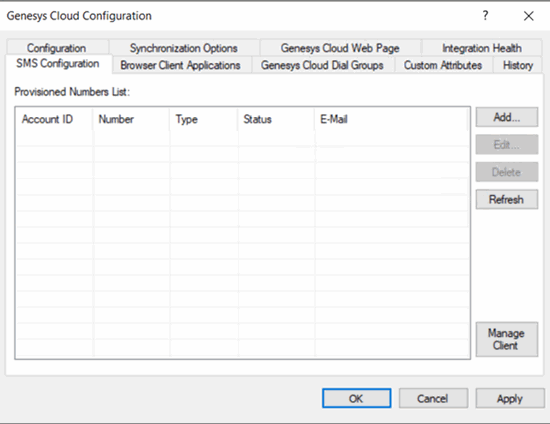
-
To deprovision a number, click Delete.
-
To refresh the provisioned number list, click Refresh.
To provision a number with Genesys Cloud
-
Click Add. The Genesys Cloud SMS Provisioning dialog box is displayed.
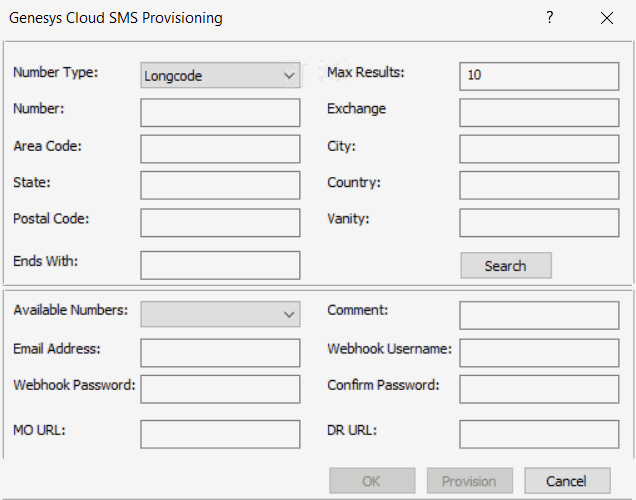
Number Type: Type of provisioned number (Longcode and Toll Free Number)
Max Results: Maximum count of available number from Genesys Cloud.
Number: SMS Provision number.
Exchange: Allowed number ranges (2-9) for the first digit and (0-9) for both the second and third digits. You might use it with area code, city, state, and postal code.
Area Code: Allowed number ranges (2-9) for the first digit and (0-9) for both the second and third digits. You might use it with exchange, city, state, and postal code.
City: The city or town. You might use it with area code, exchange, state, and postal code.
State: The state or province. You might use it with area code, exchange, city, and postal code.
Country: The country. You might use it with area code, exchange, state, and postal code.
Postal Code: The postal code. You might use it with area code, exchange, city, and state.
Vanity: It is 4 to 7 alpha-numeric vanity characters. You might use it with area code and ends with.
Ends With: Matches with vanity characters at the end of the number. You might use this with vanity.
Search: To search available numbers.
Available Numbers: List of available numbers are displayed
Comment: Associated comment
Email Address: Email address associated with SMS Provision number.
Webhook Username: Basic auth username for MO and DR webhooks.
Webhook Password: Basic auth password for MO and DR webhooks.
Confirm Password: Confirms the password by re-entering the basic auth password for MO and DR webhooks.
MO URL: URL for Mobile Originated (MO) webhook posts. You must secure (https).
DR URL: URL for Delivery Receipt (DR) webhook posts. You must secure (https).
-
Complete the information and then click Provision to provision the selected available number with details entered.
-
To cancel the operation, click Cancel or click OK to accept.
-
To update the status in the provisioned number list, click Refresh.
To edit a provisioned number with Genesys Cloud
-
Click Edit. The Genesys Cloud SMS Update Provisioning dialog box is displayed.
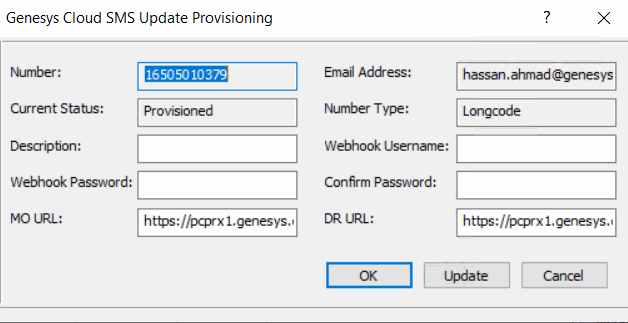
- Complete the required updates and then click Update.
Manage Client Configuration
You can manage the client configuration details for the SMS provisions.
-
Click Manage Client. The Manage Client Configuration dialog box is displayed.
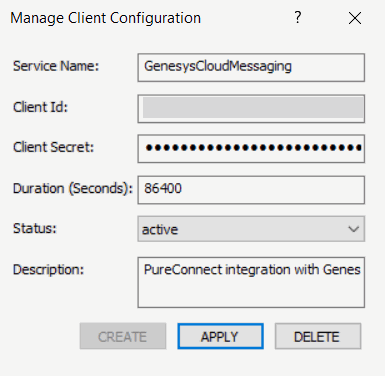
Service Name: Name of the OAuth client.
Client ID: Globally unique identifier for the client.
Client Secret: System created secret assigned to the client. Secrets are required for code authorization and client credential grants.
Duration (Seconds): Number of seconds between 10 minutes and 48 hours, until tokens created with the client expire. If this field is omitted, a default of 24 hours will be applied.
Status: Shows the situation of the client details.
Description: Provides any notable information.
-
If no client exists then to create client with default settings, click Create.
-
To apply any new modifications made, click Apply.
-
To delete the client details, click Delete.