


- Contents
Managed IP Phones Administrator Guide
Implement QoS in Your Environment
Following are the PureConnect QoS driver, SIP Soft Phones and QoS considerations, and recommended QoS configuration settings for RTP and SIP for all managed IP phone types. For general information about implementing QoS on CIC systems, see the PureConnect Quality of Service Technical Reference.
PureConnect QoS driver
In CIC, Genesys developed a new QoS driver to more closely integrate with Customer Interaction Center. It is the default QoS driver for CIC. It operates independently of the Windows QoS Packet Scheduler, which was the recommended QoS driver for CIC 3.0.
Installs that use the QoS feature include the following:
|
Application name |
Install name |
OS |
|---|---|---|
|
CIC Server |
ICServer.msi |
64-bit |
|
IC User Applications 32-bit |
ICUserApps_32bit.msi with one or both of these features selected:
|
32-bit |
|
IC User Applications 64-bit |
ICUserApps_64bit.msi with one or both of these features selected:
|
64-bit |
For a complete list of installs that use the QoS feature, see the PureConnect KB article.
The default behavior for most of these installs is to install the PureConnect QoS driver silently and add the certificate to the Trusted Publishers list. The IC User Applications installs are the exception. If you prefer to modify this default behavior, see the PureConnect KB article.
SIP Soft Phone and QoS considerations
Among managed IP phones, SIP Soft Phones have special considerations because audio originates on the computer instead of a Polycom phone or Interaction SIP Station I and II phones. The IC User Applications install (32-bit and 64-bit) with the SIP Soft Phone feature selected is one of the installs that installs the PureConnect QoS driver.
-
If the IC User Applications install is run in
Full UI mode
(through Setup.exe or double-clicking the .msi), the QoS Requirement page appears, asking the user to choose the QoS driver installation and recommending installation of the PureConnect QoS driver.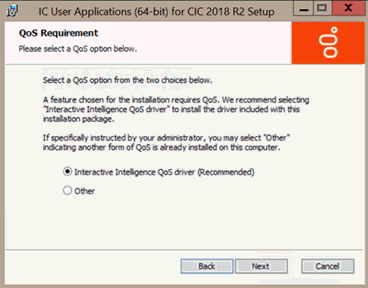
PureConnect QoS driver: If selected, the install adds the PureConnect certificate to the Trusted Publishers list, and then installs the driver.
Other: If selected, the install doesn't add the PureConnect certificate to the Trusted Publishers list and doesn't install the driver. Genesys recommends that you don't select this option unless your administrator instructs you to. Selecting this option implies use of another form of QoS.
For more information, see the PureConnect KB article.
-
If you run the IC User Applications install using Group Policy; startup or logon script; or command-line, the default is to install the PureConnect QoS driver silently and add the certificate to the Trusted Publishers list silently. To modify the default PureConnect QoS driver installation, use one of these methods to modify the QoS feature properties and run the install, as described in the PureConnect KB article.