


- Contents
WorkFlow Designer Help
Workflow History
Use the WorkFlow History tab to view workflow and event history for an account. You can view the results of tests you run to evaluate workflows and events. For example, you can start a workflow, raise events on accounts, and review the results on this tab.
To open the WorkFlow History tab
From the Window toolbar, click
the Workflow History icon  . The WorkFlow
History tab appears.
. The WorkFlow
History tab appears.
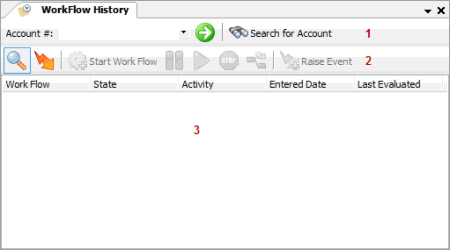
-
Search: Allows you to type an account number or search for an account for which to view workflow history.
-
Toolbar: Displays available shortcuts for the tab.
|
Icon |
Description |
|
|
Displays the workflows that are running or have run for the account. |
|
|
Displays the events raised on the account. |
|
|
Starts a workflow for the account. |
|
|
Pauses a workflow for the account. |
|
|
Resumes a workflow for the account. |
|
|
Stops a workflow for the account. |
|
|
Releases a workflow from waiting on a child workflow on the account. |
|
|
Raises an event on the account. |


-
Detail page: Displays the workflows and events that the WorkFlow Engine ran on the account, and the workflows and events a user started manually but the WorkFlow Engine hasn't run yet.
Related Topics
Search for an Account in Workflow History
View Raised Events for an Account
Start a Workflow on an Account
Pause a Workflow for an Account
Resume a Workflow for an Account
Release a Workflow for an Account