


- Contents
Interaction Process Automation Designer Help
Editing a Web Service
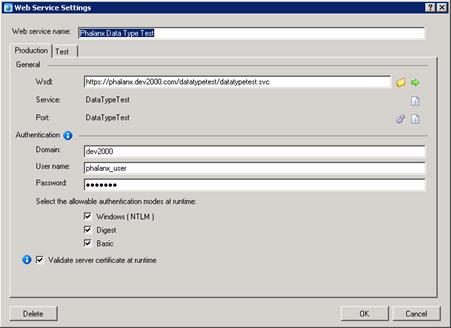
Use the Web Service Settings dialog box (see figure) to edit a web service definition that you previously created for your process.
To edit a web service:
-
Add or edit a Call Web Service action to display its dialog box:
-
Expand the Web Service drop-down list and select the desired web service.
-
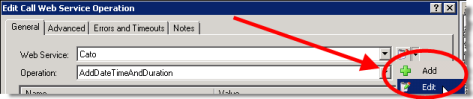
At the right end of the list box, expand the value list box and click Edit (see figure).
-
-
IPA Designer displays the Web Service Settings dialog box.
Tip: You can also click the Edit ( ) icon to display the Web Service Settings dialog box.
-
Make any desired changes on the Production or Test tab.
-
Verify the changes by clicking the green arrow icon (see figure).
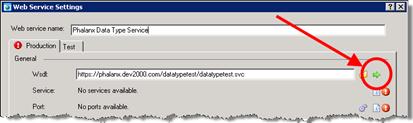
IPA Designer fetches the WSDL for the web service. If the same service and ports are available, IPA Designer automatically selects them from the refreshed WSDL. -
Click OK.
IPA Designer re-displays the Call Web Service dialog box.